 HAR Fixture Studio
Redact a HAR file in your browser
When something breaks in a web app, its support team often asks for a HAR file. That file can hold your session cookies, tokens and passwords. This page shows what a HAR leaks, what Chrome's own sanitized export removes, how to clean a HAR by hand, and a free redactor that does it in this browser tab, with nothing uploaded.
Open the HAR redactorTry it with the sample HAR
Why support teams ask for a HAR
A HAR (HTTP Archive) file is the browser's record of a session's network traffic, written as JSON by the Network panel in its developer tools. For each request it holds the URL, the method, the request headers and cookies, the request body, the status, the response headers and usually the response body, with timings. A support engineer can load it into their own DevTools and see the request that failed and what the server said back. That's why sign-in, single sign-on and API problems are so often debugged from a HAR.
The trouble is that the requests that show the problem are the same ones that carry your credentials.
What a HAR file can leak
| Where in the file | What can be there |
|---|---|
Cookie and Set-Cookie headers, and the parsed cookie lists | Session cookies. Whoever holds a live session cookie can usually act as you until it expires or you sign out. |
Authorization header | A bearer token (often a JWT), or Basic credentials, which are a username and password in base64, not encrypted. |
| Other headers | API keys and tokens under names such as X-API-Key, X-Auth-Token or X-CSRF-Token. |
| URLs, query strings and fragments | api_key=, access_token=, signature= and the like. Some sign-in flows return tokens after the # of a redirect (#access_token=…&id_token=…). The same URL is repeated in the HTTP/2 :path header, in Referer and Location headers, in a redirect's redirectURL and in Chrome's record of which script made each request, and can be in the page list at the top of the file. |
| Request bodies | A sign-in form post with your password in plain text; an OAuth token request with a client secret or a refresh token. |
| Response bodies | The access and refresh tokens a sign-in returns, your profile, and any customer names, emails and addresses the page loaded. |
| WebSocket messages | Chrome saves the frames of a WebSocket with the request that opened it, including any token sent in them. |
Redact a HAR by hand
Chrome's sanitized export
Chrome's DevTools exports a sanitized HAR by default. Its Network panel reference says the sanitized log "excludes sensitive information such as Cookie, Set-Cookie, and Authorization headers". To export a HAR with them, you first have to turn on Settings > Preferences > Network > Allow to generate HAR with sensitive data, and then pick Export HAR (with sensitive data) from the export menu. So unless someone asks you to change that setting, leave it off.
- Open DevTools (F12, or Cmd+Option+I on a Mac) and choose the Network tab.
- Tick Preserve log, so the requests stay listed when the page navigates, and reproduce the problem.
- Click Export HAR (sanitized)… (the download arrow in the Network panel's action bar) and save the file.
The documentation names three headers. It says nothing about tokens in URLs, other headers such as X-API-Key, or anything in request and response bodies, so a sanitized export can still hold a password from a sign-in form or the tokens a sign-in returned. Check the file before you send it.
Check the file in a text editor
A HAR is plain JSON, so any text editor can open it. Search it for Bearer, eyJ (how most JWTs begin), token, key, secret, password, session and your own email address. Replace each value you find with something like REDACTED, keeping the quotes and the name in front of it, so the file stays valid JSON and the support engineer can still see which header or field was there. It's slow in a big file: a few minutes of browsing can produce thousands of requests.
The free HAR redactor
The HAR redactor does that search and replace for you, with the same rules and scanner that HAR Fixture Studio uses for test fixtures. It's free, with no limit on requests and no account or license.
- Click Open a HAR file, or drop the file on the page. HAR files from Chrome, Edge, Firefox and other HAR 1.2 exporters work, up to 200 MB.
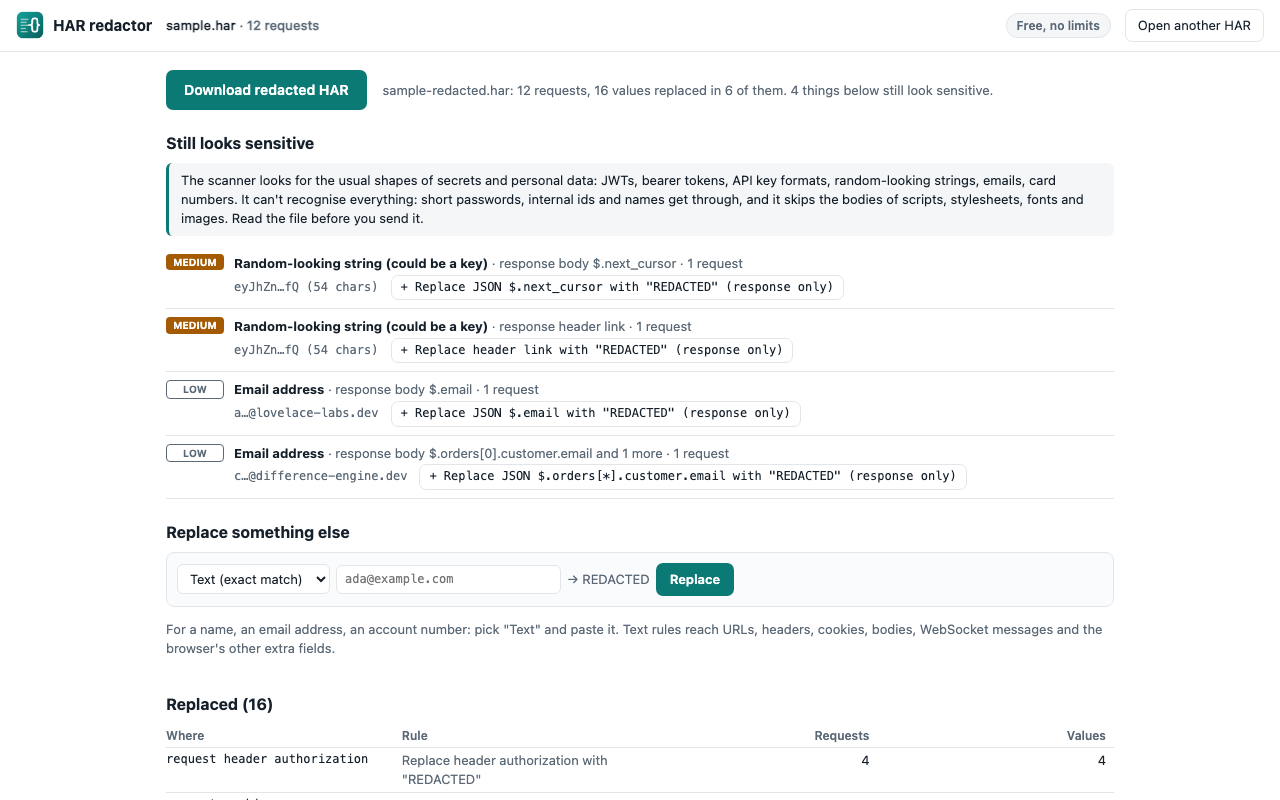
- The default rules run at once. The Replaced table lists every place they changed something (a header, a query parameter, a form field, a JSON field), the rule that did it, and in how many requests.
- Still looks sensitive lists what the scanner recognises in what's left: private keys, JWTs, Bearer and Basic credentials, common API key formats, card numbers, random-looking strings and email addresses. Where a rule would fix it, the entry has a button that adds one for that header, parameter or JSON field.
- Under Replace something else, paste anything else that shouldn't leave, such as your name, an account number or a customer's email, and click Replace. Exact-text rules reach URLs, headers, cookies, bodies, WebSocket messages and the browser's other extra fields.
- Click Download redacted HAR. You get
<name>-redacted.har.
The default rules replace the values of Authorization, Proxy-Authorization, Cookie and Set-Cookie headers and of headers whose names contain token, api-key, secret, session or signature; query and form fields such as access_token, api_key, key, client_secret, signature, password and session_id, in a URL's query and its fragment, in a form post, everywhere the URL is repeated and in URLs inside the browser's extra fields, such as the script call stacks Chrome records for each request; and JSON fields such as access_token, refresh_token, id_token, password and client_secret at any depth. Each value becomes REDACTED. Names stay, and so does everything else: every request, status, timing and the rest of each body, so the file still shows what went wrong. You can switch any rule off under Rules.
The scanner can't recognise every secret: short passwords in fields with ordinary names, internal ids and people's names get through. It also skips the bodies of scripts, stylesheets, fonts and images, which are usually public files (the rules still apply to them). Read the file before you send it, and tell the support team which values you replaced.
Your HAR stays in the tab
The redactor is a page that reads the file in your browser's memory and hands the result back as a download. It doesn't upload the HAR, has no license check and sends nothing anywhere; the one request it can make is for the bundled sample HAR, from this site, when you ask for it. The page's security policy only lets it connect to this site and to Polar's license check, which the redactor never calls, and the site's analytics script can't load on it. You can watch for yourself: open DevTools, choose the Network tab, then open a HAR in the redactor and download the result. The privacy policy has the details.
From a HAR to test fixtures
If the HAR comes from your own app and you write Playwright tests, HAR Fixture Studio turns the same file into JSON fixtures, one per endpoint, with a ready-made mocks.ts for page.route, using these redaction rules. It's free for one endpoint at a time, and $19 once for any number.