 HAR Fixture Studio
HAR file in, Playwright mocks out
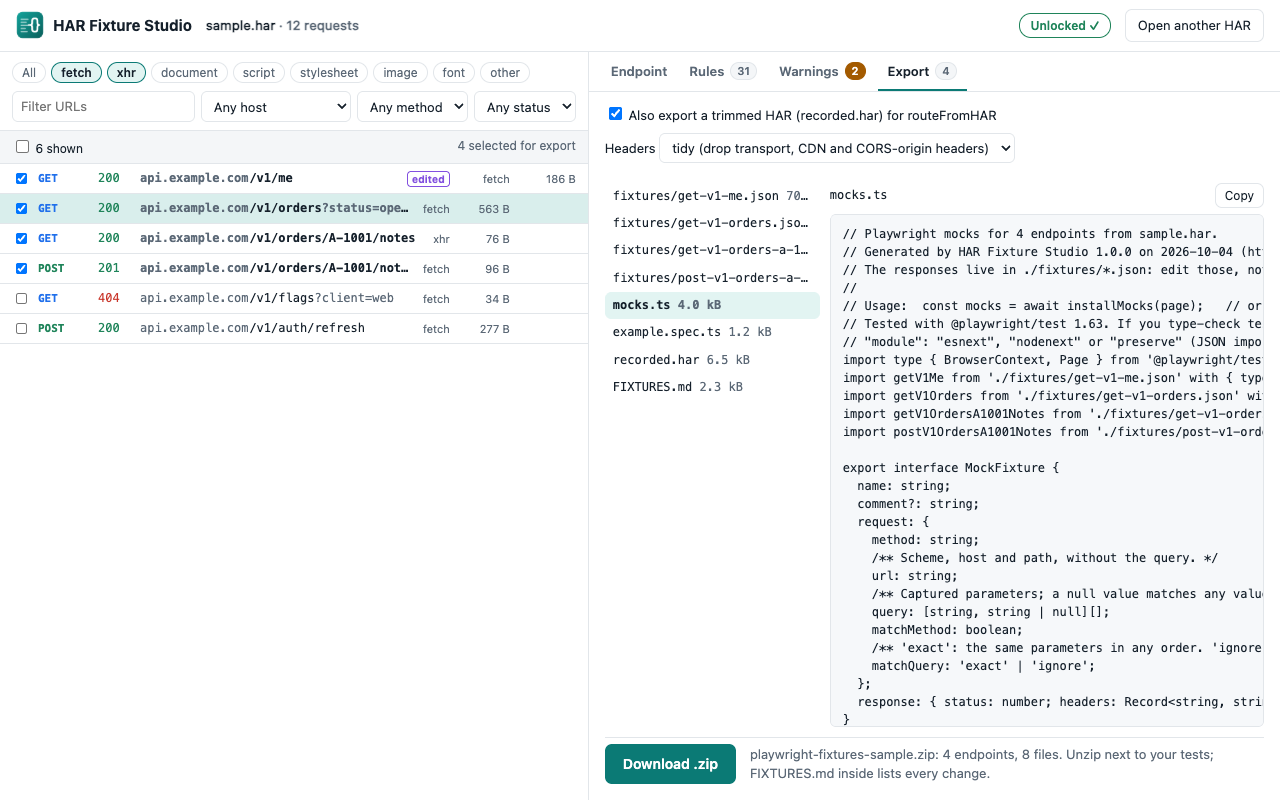
HAR Fixture Studio turns a HAR file from your browser's Network panel into small, readable Playwright fixtures. Pick the API calls your test needs, edit the responses, redact tokens and personal data with rules you can see, and export JSON fixtures with a ready-made mocks.ts. It runs in your browser: the HAR is read by the page and never uploaded.
Open the appTry it with the sample HAR
Why not just routeFromHAR?
Playwright can replay a whole HAR with page.routeFromHAR, and that's often enough. It gets awkward when:
- the HAR holds 200 requests and the test needs three;
- you want to change a response (an empty list, an error, a very long name) without editing hashed files by hand;
- the capture holds tokens, cookies and customer emails that can't go into the repository. Chrome's sanitized HAR export removes Cookie, Set-Cookie and Authorization headers, but not tokens in URLs, custom key headers or anything in a response body;
- the app sends query parameters in another order, or with another API key, than the capture.
routeFromHARmatches the URL exactly.
How it works
- Export a HAR. In DevTools, open Network, reproduce the flow, and export the HAR. Files from Chrome, Edge, Firefox or any other HAR 1.2 exporter work, up to 200 MB.
- Pick. In the app, click Open a HAR file (or drop it on the page). Filter by resource type (fetch, xhr and so on), host, method, status or URL text, and tick the requests to keep.
- Edit. On the Endpoint tab, change a response body (JSON is checked as you type; Format and Reset to captured are there), the status, the fixture name, and whether the method and query must match.
- Redact. On the Rules tab, rules remove or replace headers, query parameters, JSON paths (
$..email,$.users[*].phone) and exact text. Thirty default rules cover the usual credentials (Authorization, cookies,*token*and*api-key*headers, key and signature query parameters,$..access_token,$..passwordand similar). Each rule shows how many values it changed. - Review the warnings. The Warnings tab lists what still looks sensitive: private keys, JWTs, Bearer and Basic credentials, common API key formats, card numbers, random-looking strings, emails. Each warning offers a matching rule. The scanner warns and never edits, and it can't recognise every secret: read the files before you commit them.
- Export. On the Export tab, preview every file and click Download .zip.
What's in the zip
| File | What it is |
|---|---|
fixtures/<name>.json | One per endpoint: method, URL, query, status, headers and body |
mocks.ts | installMocks(page) routes each fixture with route.fulfill. Query parameters match in any order, a redacted value matches any value, and every other request goes to the network. No runtime dependency beyond @playwright/test |
example.spec.ts | A test that opens your app with the mocks and checks each one answered |
recorded.har | Optional: the selected requests as a trimmed, redacted HAR for routeFromHAR |
FIXTURES.md | Every change made and every warning left |
A test using it, with an order from the bundled sample HAR:
import { test, expect } from '@playwright/test';
import { installMocks } from './mocks';

test('dashboard shows the orders', async ({ page }) => {
  const mocks = await installMocks(page);
  await page.goto('http://localhost:3000/dashboard');
  await expect(page.getByText('Brass gear set')).toBeVisible();
  expect(mocks.unused()).toEqual([]);
});
The generated files are tested with @playwright/test 1.63 in Chromium, in ES-module and CommonJS projects. If you type-check your tests with tsc, enable resolveJsonModule and use module esnext, nodenext or preserve: mocks.ts imports the JSON with with { type: 'json' }.
Two things the export fixes that trip up a raw captured HAR: it drops the captured Access-Control-Allow-Origin and -Credentials headers, which name the site the HAR came from and make the browser block the mocked response for an app on localhost; and query rules also rewrite the HTTP/2 :path, Referer and Location headers, where a redacted key would otherwise survive.
Free and full version
| Free | Full, $19 one-time | |
|---|---|---|
| Filters, body editing, rules, scanner, trimmed HAR | Yes | Yes |
| Endpoints per export | 1 | Any number |
| Saved rule sets (per API or project) | No | Yes |
The full version is one payment for HAR Fixture Studio 1.x, every 1.x update included; no subscription and no account. It's sold through Polar, the merchant of record, which handles sales tax and VAT and emails you a license key.
The full version isn't on sale yet. Until it is, the free version works as described, and the app's Unlock button opens this page.
Activate a license key
In the app, open the Export tab with more than one endpoint ticked, click Have a license key?, paste the key and click Activate. The key is checked with Polar and remembered in that browser. Find my key opens Polar's customer portal if you've lost the email.
Your HAR stays on your computer
A HAR can hold passwords, tokens, cookies and customer data, so the app never uploads it. The page reads the file in the tab, builds the zip there and hands it to you as a download. Its security policy lets it contact one outside address, Polar's license check, and only with a license key; that request carries the key and nothing from the HAR. The privacy policy has the details.
Limits
- Playwright with TypeScript only. No MSW, Cypress or other output.
- No live recording: export the HAR from your browser first.
- GraphQL requests to one URL are one endpoint to the matcher; it doesn't tell operations apart.
- One response per request: the same request twice returns the same fixture.
- Request headers and bodies aren't used for matching in
mocks.ts(routeFromHARdoes match POST bodies). - The scanner warns; it doesn't guarantee a file holds no secrets.
- Tested with synthetic HAR files in Chrome's and Firefox's shapes; the request list shows up to 1,000 rows. The generated code is tested in Chromium only.
- A Chrome extension version is built but not in the Chrome Web Store.
Support
If a HAR won't load or an export doesn't run, get in touch. Describe the problem rather than sending the HAR: it may hold credentials.