 AI Markdown Copier
Any web page, as clean Markdown for AI
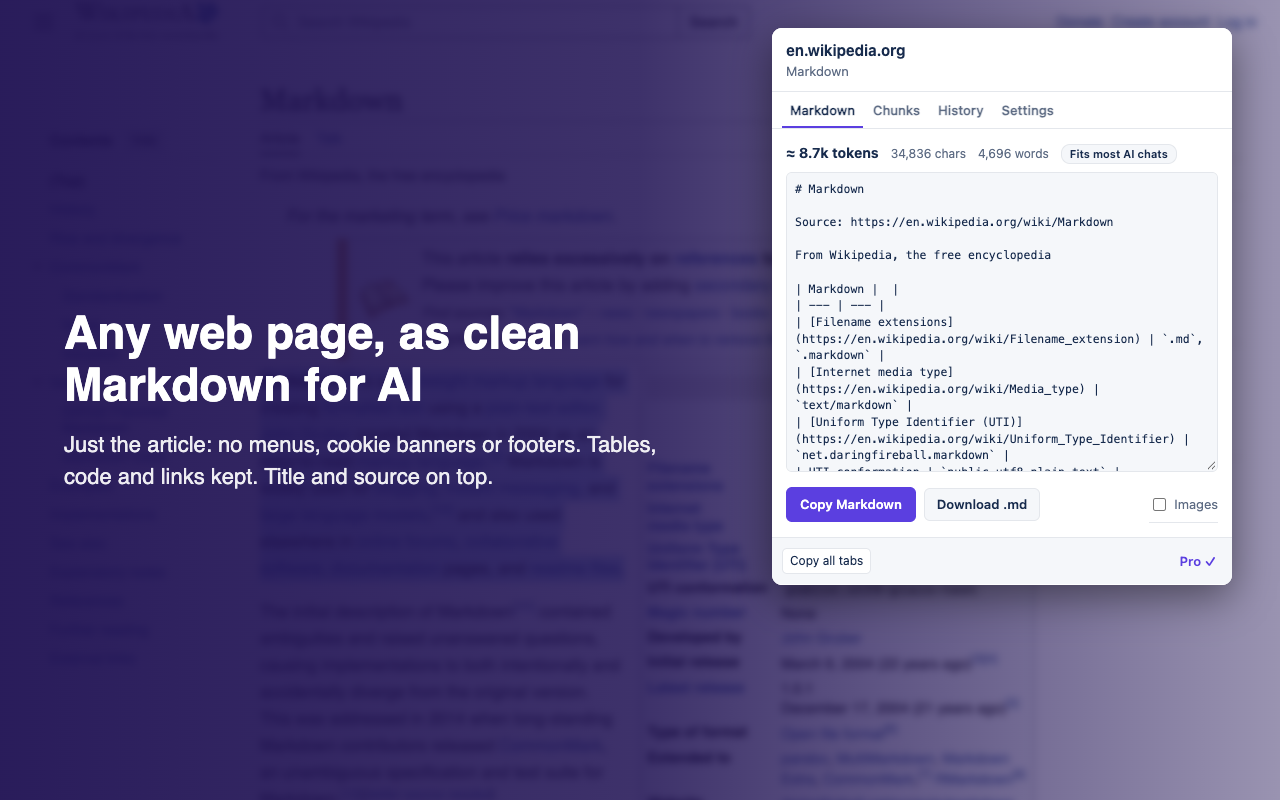
AI Markdown Copier is a Chrome extension. Click its toolbar icon on any page to get the page's main content as clean Markdown, with a token estimate, ready to paste into ChatGPT, Claude, Gemini or any other AI chat. Everything happens on your computer; nothing you copy is sent anywhere.
What you get
- Just the content. The article, docs page, README or answer, without menus, cookie banners, sidebars, ads and footers. The main content is found with Mozilla's Readability (the engine behind Firefox Reader View); when a page has no clear article, the extension keeps the page's main area and drops navigation, headers, footers and pop-ups.
- A header. The page title and source URL on top, so the AI (and you, later) know where it came from.
- Structure kept. Tables as Markdown tables, code blocks with their language, lists, headings, bold and italics, and links made absolute so they still work once pasted.
- Q&A pages whole. On Stack Overflow and other Stack Exchange sites, the question and every answer, with their votes and the accepted answer marked.
- A size check. An estimate of the tokens (about 4 characters each; exact counts differ a little between models), characters and words, and whether it fits any AI chat, most chats, or only long-context models.
Three ways to copy
| How | What it copies |
|---|---|
| Click the toolbar icon | The page, with a preview. Copy Markdown or Download .md. Tick Images to include image links. |
| Select text, right-click, Copy selection as Markdown | Just the selection, with a source line under it. A selection inside a code block stays a code block. |
| Alt+Shift+C | The page, straight to the clipboard, without opening anything. A green tick on the icon means it's copied. (Alt+Shift+M opens the popup. Change either at chrome://extensions/shortcuts.) |
Free and Pro
| Free | Pro ($2.99 a month or $19 a year) | |
|---|---|---|
| Page and selection copies, token estimate, download | Yes, unlimited | Yes |
| Copy all tabs in a window as one document, with a table of contents | No | Yes |
| Chunks for RAG: split at headings into pieces of a size you choose in tokens; copy one at a time, all at once, or download JSON Lines | No | Yes |
| Templates: YAML front matter, a citation line, content only, or your own | Title and source header | Yes |
| History of your last 50 copies | No | Yes, stored on your device only |
Pro is sold through Polar, which also handles sales tax and VAT. After you pay, Polar emails you a license key: open the popup, click Chunks, then Have a license key?, paste the key and click Activate. Use the same key on your other computers or browser profiles. To find your key, or to manage or cancel your subscription, click Pro ✓ at the bottom of the popup (or Find my key) to open Polar's customer portal.
Templates
In the popup's Settings, Pro users pick the header: Title and source (the default), YAML front matter, Quoted source line, Content only, or Custom. A custom template is plain text with these variables:
{{title}} {{url}} {{domain}} {{site}} {{author}} {{published}} {{description}} {{date}} {{datetime}} {{words}} {{tokens}} {{content}}
Add |yaml to quote a value for front matter, as in title: {{title|yaml}}; front-matter lines whose value is empty are left out. Without {{content}}, the content goes after the template.
Copy all tabs (Pro)
Click Copy all tabs at the bottom of the popup. The extension doesn't have access to your other tabs, so the page that opens asks Chrome for permission to read pages on all sites, once, when you click Allow and choose tabs. Pick the tabs, click Make the document, and copy or download the result. By default the extension hands the permission back as soon as the document is made, and asks again next time; to keep it, tick Keep access to all sites in Settings. Tabs Chrome has put to sleep are skipped (open them once and try again), and Chrome's own pages can't be read.
Permissions
| Permission | Why |
|---|---|
activeTab | Read the page you're on, only when you click the icon, use the menu item or press the shortcut. |
scripting | Run the converter, which ships inside the extension, on that page. |
storage | Keep your settings, and Pro's history and license key, on your device. |
contextMenus | The two right-click items. |
| Read all sites (optional) | Asked for only when you use Pro's Copy all tabs, and handed back afterwards unless you choose to keep it. |
It runs nothing in the background while you browse and loads no code from the internet.
Limits
- Chrome doesn't let extensions read its own pages (
chrome://), the Chrome Web Store, other extensions' pages, or PDF files. - Content inside frames and closed shadow DOM (some embedded widgets and web components) isn't included, and a selection inside a frame can't be copied from the menu.
- Pages without a clear article (home pages, dashboards, app-like pages) come out as the whole page minus its furniture, which can be noisy. Select the part you want and use the right-click item instead.
- The token count is an estimate at about 4 characters per token (one per character for Chinese, Japanese and Korean). Real counts differ between models, more so for code.
Converting hundreds of pages?
The extension converts the pages you have open. For a list of URLs, or a whole docs site from its sitemap, the same job runs in the cloud as an Apify actor, Page to Markdown: clean Markdown for every page in one dataset, ready for a RAG pipeline, paid per page, with no browser open.
Credits
Built on Readability (Apache License 2.0) and Turndown with the Joplin fork of its GitHub-Flavored Markdown plugin (MIT). Their licences ship inside the extension, in licenses/. This extension isn't made or endorsed by Mozilla, OpenAI, Anthropic or Google.