 Tech Stack & SEO Inspector
What a website is built with, and how its SEO scores
Tech Stack & SEO Inspector is a Chrome extension. Click its toolbar icon on any page to see the technologies behind it and an on-page SEO score from 0 to 100. Everything is worked out on your computer; nothing about the pages you inspect is sent anywhere.
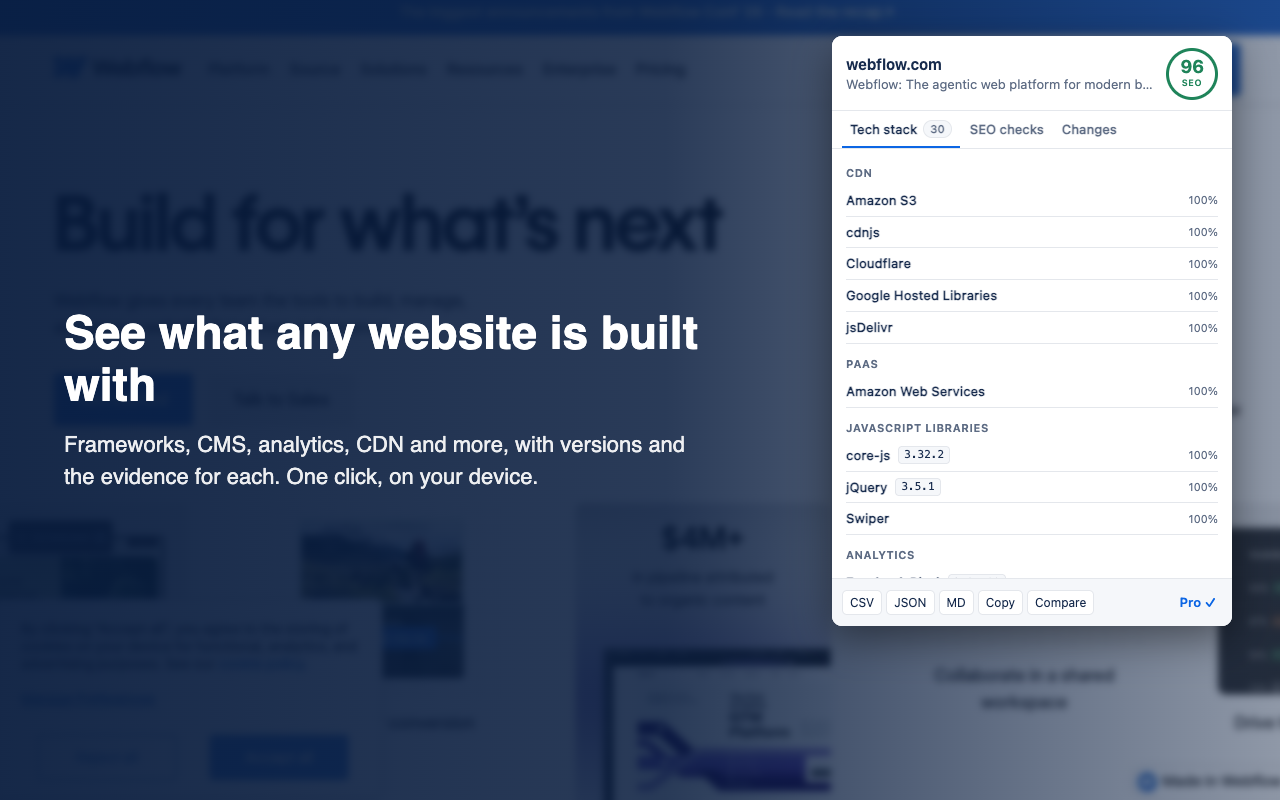
Tech stack
About 3,500 technologies (CMS, ecommerce platforms, JavaScript frameworks and libraries, analytics, tag managers, CDNs, hosting, payment and marketing tools), grouped by category, with the version where the page reveals it and a confidence score. Open any row to see the evidence: the script URL, meta tag, header, cookie name, page element or JavaScript variable that matched.
Because it runs in your browser, it sees what server-side scanners can't: JavaScript variables the page sets, elements added after load, and scripts that tag managers load later. It also re-requests the page once from the page itself to read the response headers (server, CDN, framework headers). If a server refuses that, the popup says header-based results may be missing.
SEO checks
| Check | What's flagged |
|---|---|
| Title | Missing (error), over 60 characters (warning), under 30 (notice), more than one <title> |
| Meta description | Missing (warning), over 160 or under 70 characters (notice) |
| Headings | No <h1> (warning), several (notice), skipped levels such as h2 → h4 (notice) |
| Indexing | noindex in the robots meta tag or X-Robots-Tag header (warning), nofollow (notice) |
| Canonical URL | Missing (notice), pointing to another page (notice) or another site (warning) |
| Mobile and language | No viewport meta tag (warning), no lang on <html> (notice) |
| Security | Plain http (warning), http:// resources on an https page, i.e. mixed content (warning) |
| Images | Missing alt (warning, with coverage), links that are only an image with no alt text (warning), no width and height (notice) |
| Social and structured data | Missing og:title/og:description/og:image or twitter:card (notice), JSON-LD that doesn't parse (warning); the JSON-LD types found are listed |
| Other | hreflang alternates that don't include the page (notice), under 200 words (notice), internal, external and nofollow link counts (information) |
The score starts at 100 and loses 20 points per error, 8 per warning and 2 per notice (each check counts once), never going below 0. The thresholds are common SEO conventions, not search engine rules. The checks read the page as rendered in your browser, so tags added by JavaScript count.
Free and Pro
| Free | Pro ($3.99 a month or $29 a year) | |
|---|---|---|
| Tech stack and SEO score for the current page | Yes, unlimited | Yes |
| Per-site history and "what changed since your last visit" (technologies added or removed, version changes, SEO score change, issues fixed or new) | No | Yes, stored on your device only |
| Export to CSV, JSON or Markdown, and copy to the clipboard | No | Yes |
| Compare two saved sites side by side | No | Yes |
Pro is sold through Polar, which also handles sales tax and VAT. After you pay, Polar emails you a license key: open the popup, click Have a license key?, paste it and click Activate. Use the same key on your other computers or browser profiles. To find your key, or to manage or cancel your subscription, click Pro ✓ at the bottom of the popup (or Find my key) to open Polar's customer portal.
Permissions
| Permission | Why |
|---|---|
activeTab | Read the page you're on, only when you click the icon. The extension can't see any other tab or any page you don't inspect. |
scripting | Run the reader on that page, once, when you click. |
storage | Keep Pro history and your Pro license key on your device. |
It has no access to all websites, runs nothing in the background while you browse, and loads no code from the internet.
Limits
- Chrome doesn't let extensions read its own pages (
chrome://), the Chrome Web Store, or other extensions' pages. - Detection uses a fingerprint set from early 2023 plus additions of ours, so very new products may be missing.
- The SEO checks cover one page as rendered. They don't crawl the site, fetch robots.txt or sitemaps, or check links for errors.
Checking hundreds of sites?
The extension checks the page in front of you. For a list of sites, or a whole site, the same detection and SEO checks run in the cloud as Apify actors, with results as a spreadsheet (CSV, JSON or Excel), paid per site:
- Tech Stack Detector: the technologies of every website in a list of URLs, with versions and evidence. Useful for lead lists and market research.
- SEO Audit: crawls a whole site and reports on-page issues page by page, including the robots.txt, sitemap and broken-link checks this extension doesn't do.
Credits
Technology fingerprints are from the Wappalyzer project's last MIT-licensed release (January 2023), plus our own additions; the licence and notice ship inside the extension. This extension isn't made or endorsed by Wappalyzer.